ChatGPT Ads only became available to Indian advertisers in the last few days OpenAI switched on advertising in India on August 28-29, 2026, with self-serve access following shortly after. If you’re trying to figure out how to run ChatGPT ads right now, you’re evaluating one of the newest paid channels available to Indian marketers, not a mature platform with years of playbooks behind it.
This guide walks through how OpenAI’s Ads Manager actually works today campaign structure, targeting through context hints, creative requirements, and measurement based on current, verified platform documentation rather than assumptions. Explore performance marketing services from SocioLabs if you’re weighing ChatGPT Ads against your existing paid channels.
What Are ChatGPT Ads?
ChatGPT Ads are sponsored placements that appear below ChatGPT’s answers to relevant conversations, clearly labeled as advertising and visually separate from the AI-generated response itself. They’re shown only to logged-in adult users on ChatGPT’s Free and Go tiers Plus, Pro, Business, and Enterprise subscribers don’t see ads.
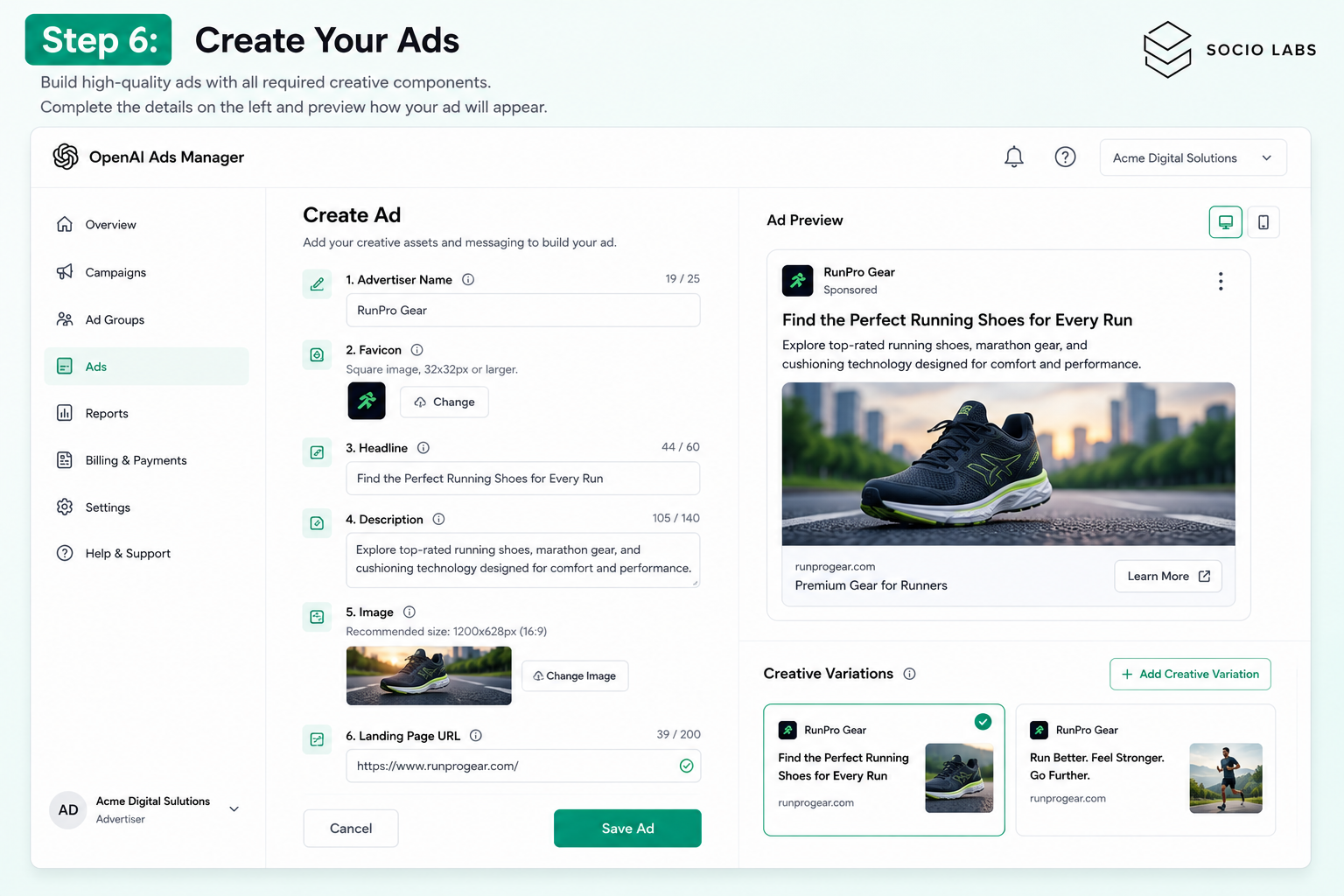
Every ad is built from the same six components: advertiser name, a small brand favicon, a headline (title), short description copy, one image, and a landing page URL. This is a genuinely different format from a traditional search or display ad it’s a single, compact card, not a headline-and-multiple-descriptions setup like Google Ads.
OpenAI has been explicit that ads don’t influence ChatGPT’s actual answers the response you’d get without ads stays the same, with a sponsored card appearing beneath it when relevant.
How Do ChatGPT Ads Work?
ChatGPT Ads work on a match-and-serve basis: advertisers set up campaigns with plain-language “context hints” describing relevant conversation topics, and OpenAI’s system matches ads to conversations based on relevance, then serves the closest-matching ad beneath the response.
The flow looks like this: a user has a conversation → the system identifies relevant commercial context → an eligible ad is selected through a relevance-weighted auction → the ad appears as a labeled card below the answer → the user can click through to your landing page → performance gets tracked in your Ads Manager dashboard.
Importantly, advertisers never see the actual content of a user’s conversation. You get aggregate performance data impressions, clicks, and post-click conversion events if you’ve set up measurement not access to chat history or personal details.
How to Run ChatGPT Ads Step by Step
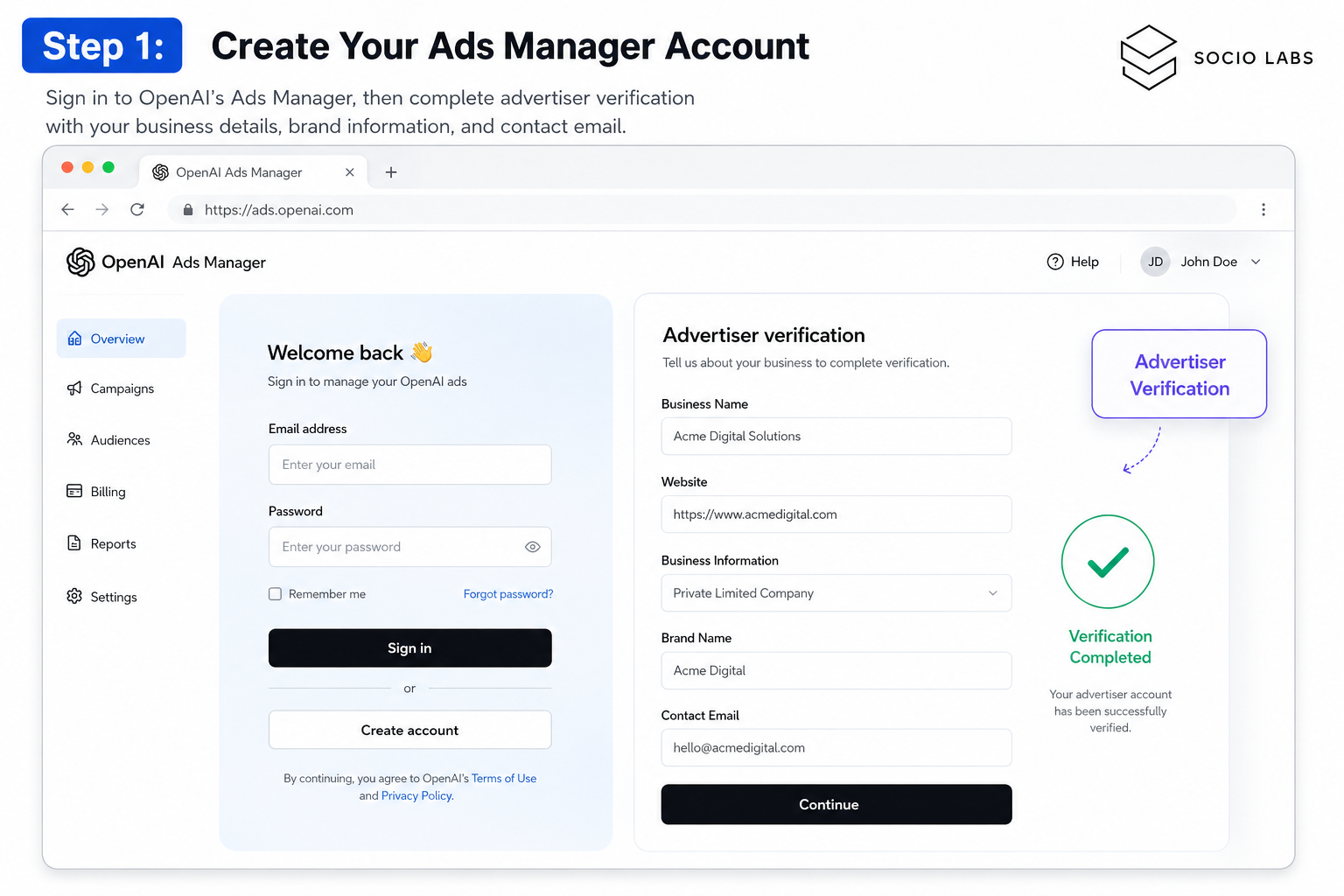
Step 1: Create Your Ads Manager Account
Sign in to OpenAI’s Ads Manager at ads.openai.com using an OpenAI account, then complete advertiser verification with your business details, brand information, and contact email.
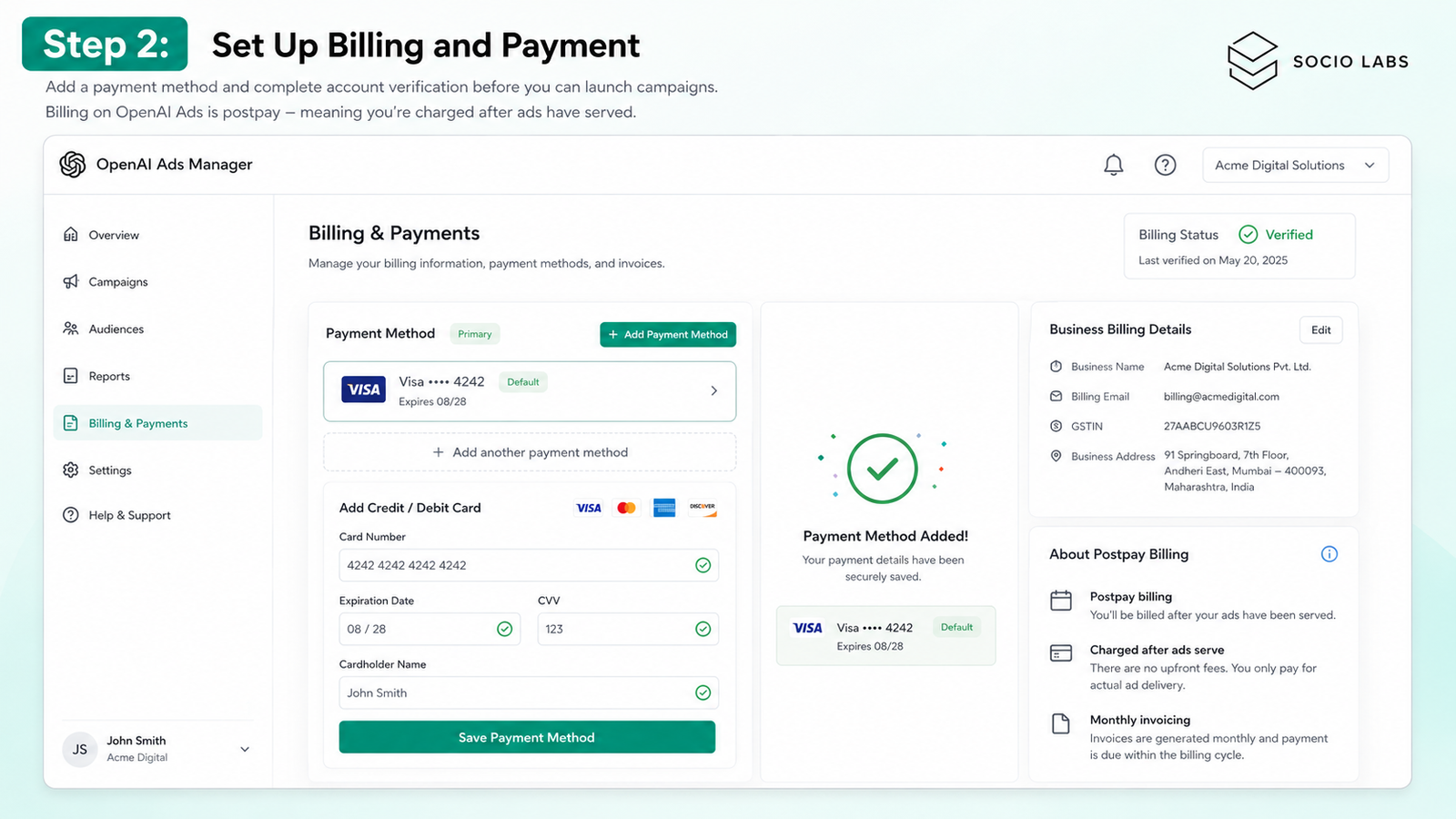
Step 2: Set Up Billing and Payment
Add a payment method and complete account verification before you can launch campaigns billing on ChatGPT Ads currently runs postpay, meaning you’re charged after ads have served rather than prepaying a balance.
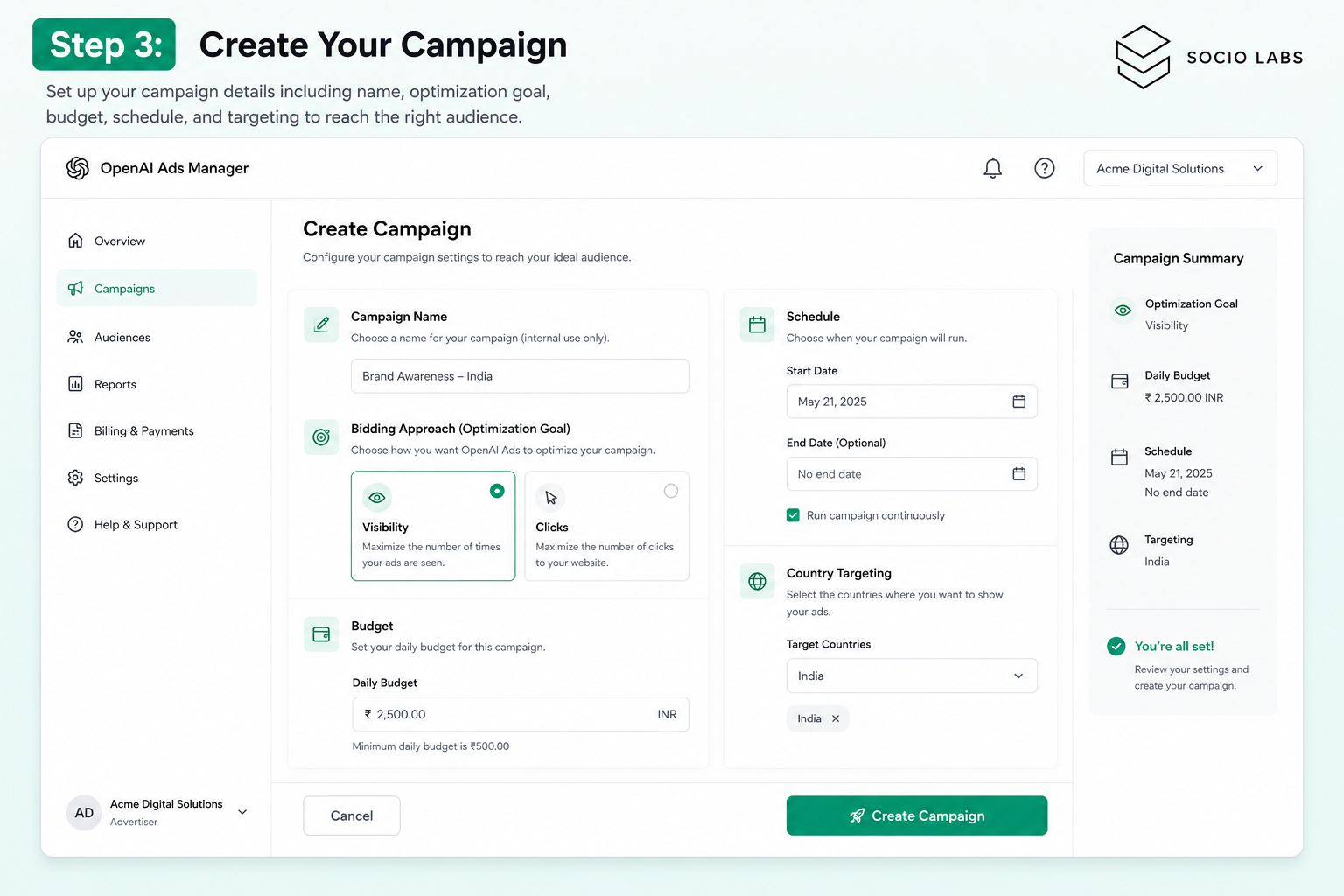
Step 3: Create Your Campaign
At the campaign level, you’ll set the campaign name, choose your bidding approach, define your budget and schedule, and select country targeting. This is also where you lock in whether you’re optimizing for visibility or clicks that choice can’t be changed after launch.
Step 4: Choose the Right Campaign Objective
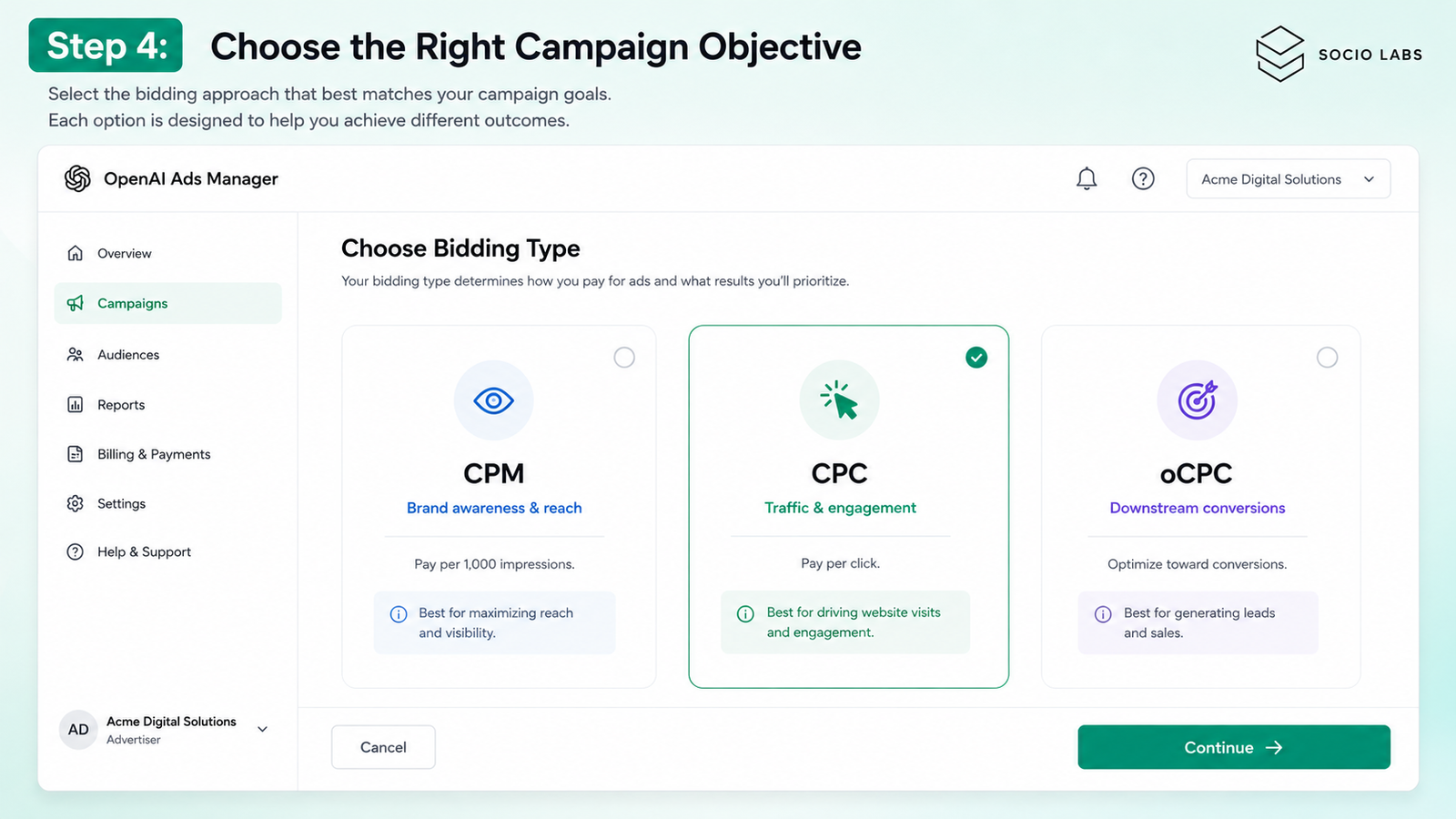
Your bidding choice is set at the campaign level:
Bidding Type
Best For
How It Works
CPM
Brand awareness, reach
You pay per thousand impressions
CPC
Traffic, engagement
You pay per click; current starting bids run roughly $3-5
oCPC
Downstream conversions
Optimizes toward a conversion action once measurement is configured
CPM suits campaigns where visibility itself is the goal; CPC and oCPC suit campaigns where you need people to actually click through and take an action.
Step 5: Create Ad Groups and Set Context Hints
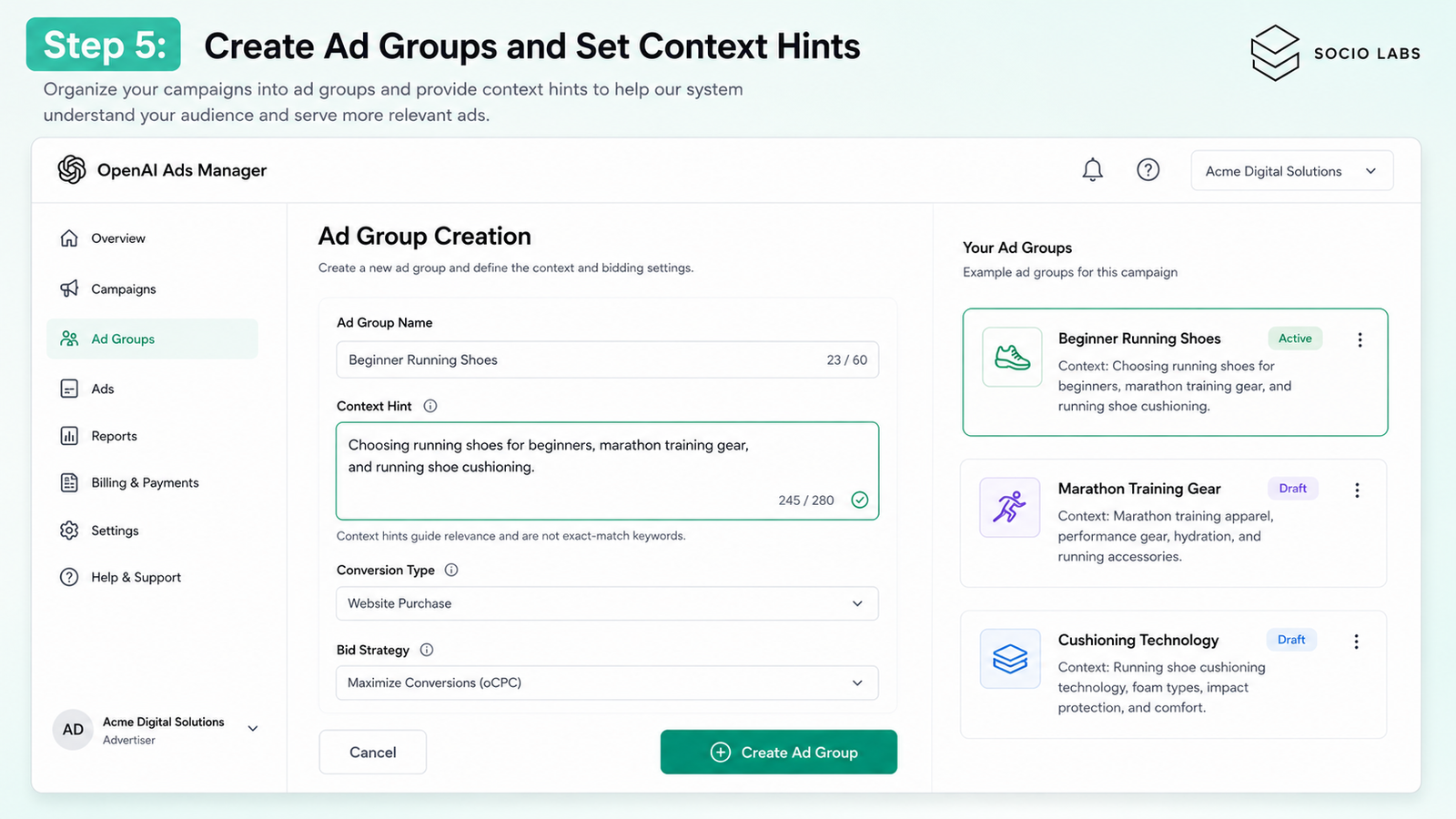
Ad groups sit inside a campaign and are where the real targeting happens. Each ad group gets its own plain-language context hint a short description (roughly up to 280 characters) of the conversations and topics your ad is relevant to.
This is worth understanding clearly: context hints are not exact-match keywords the way Google Ads keywords work. OpenAI’s own guidance describes them as hints that “guide matching but aren’t exact-match targeting rules” — the system weighs your hint alongside your ad copy and landing page to decide relevance, it doesn’t lock onto literal keyword matches.
A running shoe brand, for example, might create separate ad groups with hints around choosing running shoes for beginners, marathon training gear, and comparing cushioning technology — distinct enough that each ad group’s creative can speak directly to that specific context rather than one generic message covering everything.
Conversion type and bid strategy (Maximize results, or a manual max bid) are also set at the ad-group level, not the campaign level meaning one campaign can pursue different conversion goals across different ad groups.
Step 6: Create Your Ads
Build your ad using the six required components advertiser name, favicon (minimum 64×64px), headline, description copy, one image, and your landing page URL. Create multiple creative variations within an ad group to test what resonates before scaling spend.
Step 7: Submit for Review
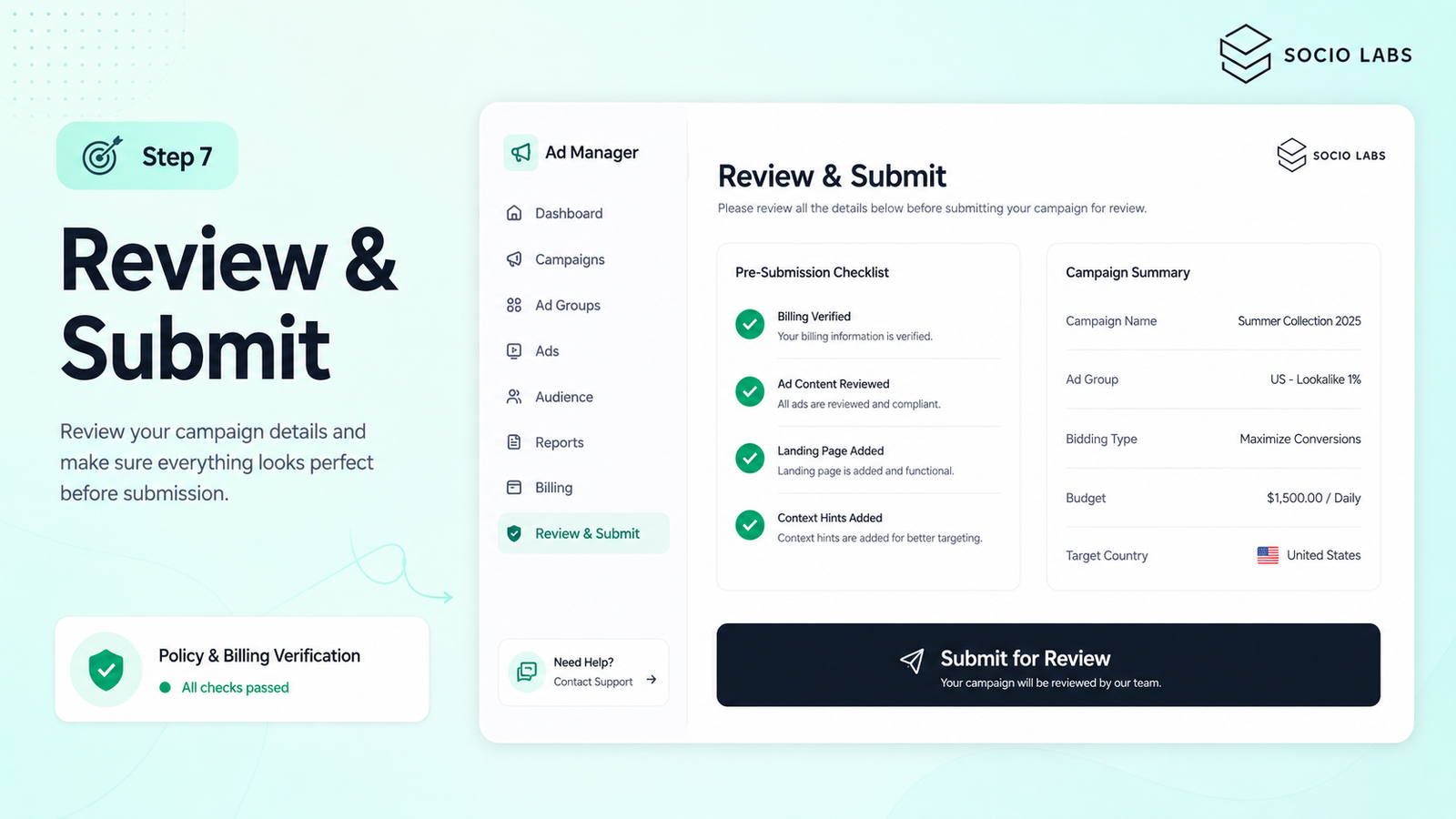
Campaigns go through policy and billing verification before going live. If a campaign isn’t serving after submission, check that billing is confirmed, that your ad content meets policy guidelines, and that your context hints are specific enough to match real conversation volume.
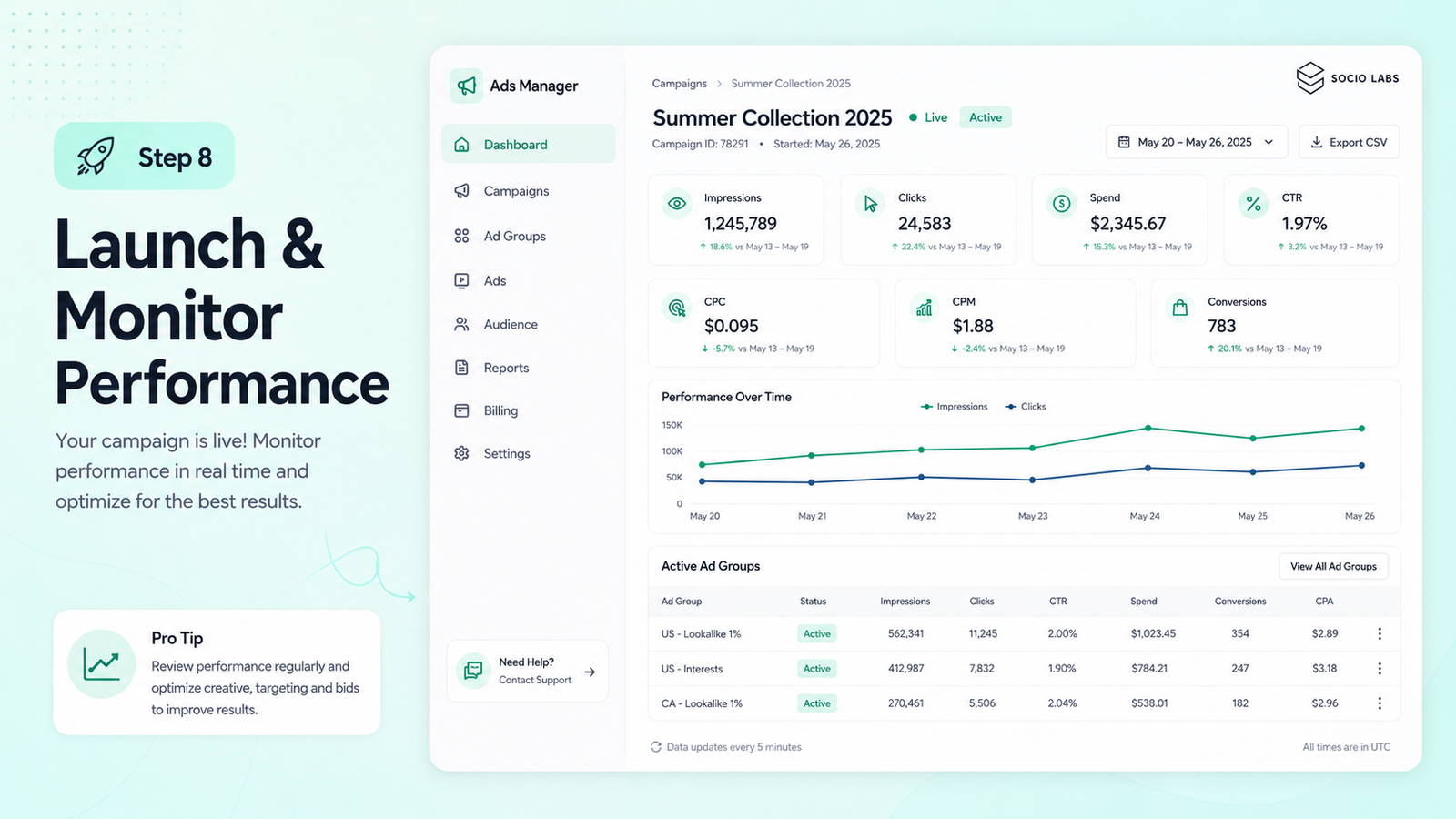
Step 8: Launch and Monitor Performance
Once live, monitor impressions, clicks, spend, CTR, CPC or CPM, and conversions (if configured) directly in the Ads Manager dashboard, with table views, charts, and CSV export available for reporting.
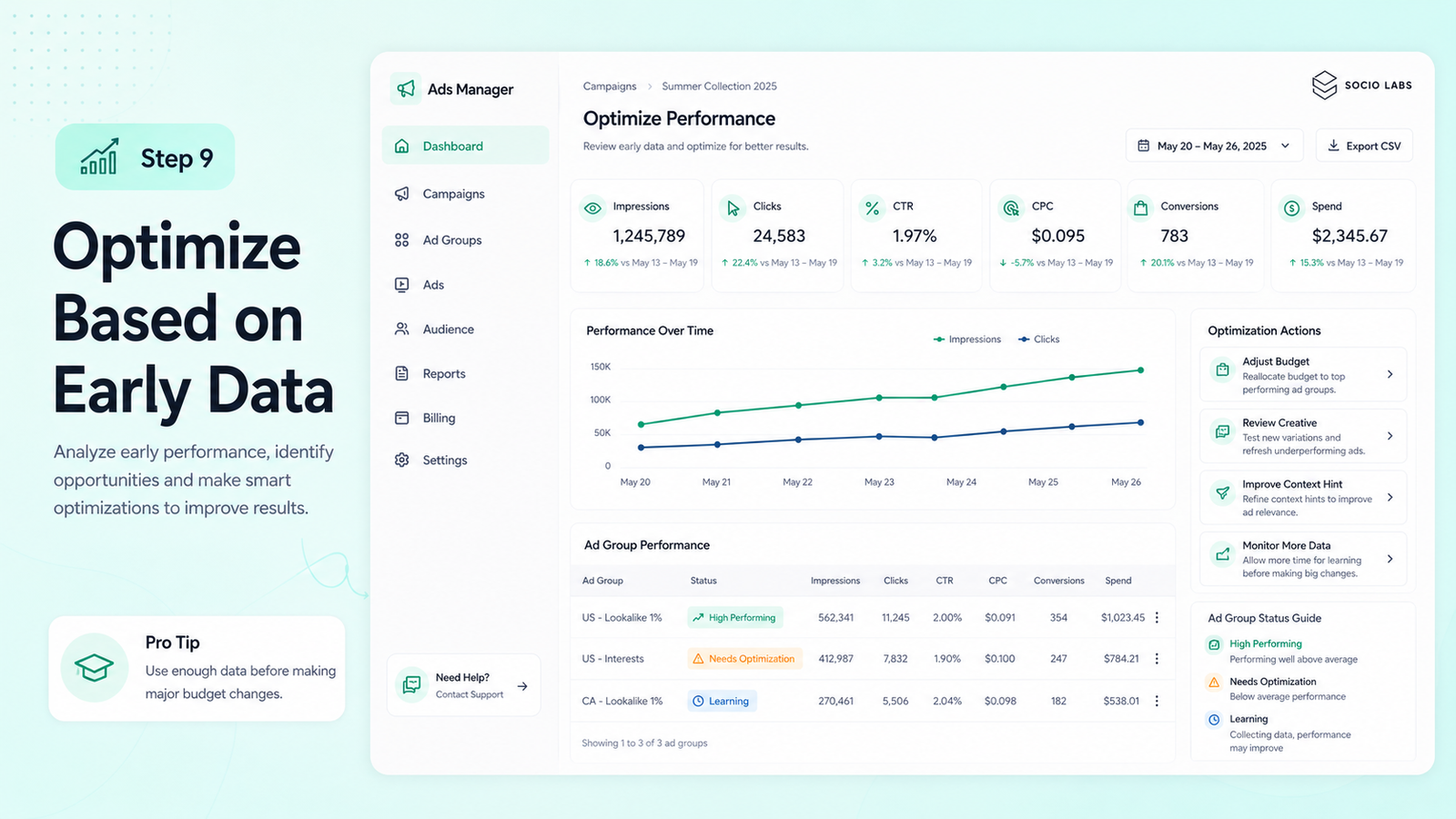
Step 9: Optimize Based on Early Data
Early performance data should be read cautiously a few days of data rarely justifies major budget shifts. Give campaigns enough volume to be statistically meaningful before reallocating spend or pausing underperforming ad groups.
How Does Targeting Work in ChatGPT Ads?
Targeting in ChatGPT Ads works primarily through context hints at the ad-group level combined with country targeting at the campaign level it’s built around conversational context and relevance, not the keyword-list or demographic targeting structures common in traditional search and social advertising.
This is a genuinely different mental model from Google Ads keyword targeting. Instead of bidding on exact search terms, you’re describing the kinds of conversations where your product is relevant, and OpenAI’s relevance system decides when to actually show your ad.
Advertisers cannot target individual users based on the private content of their conversations OpenAI has been explicit that context hints work on aggregate relevance matching, not access to what any specific user has typed.
How Should You Create ChatGPT Ads?
Effective ChatGPT ad creative leads with a clear value proposition in the headline, uses concise description copy, and sends users to a landing page that matches what the ad promised consistency between ad and landing page matters more here than in feed-based formats users scroll past quickly.
Because ChatGPT ads appear inside a conversational context rather than a passive scroll, the creative mindset shifts: users have already expressed relevant intent through their conversation, so ads that feel like a natural, useful next step tend to perform better than broadly branded messaging.
Write a clear, specific headline over a generic brand tagline
Keep description copy short and benefit-focused
Use an image that reinforces the offer, not just brand imagery
Match landing page content directly to what the ad promises
Create multiple creative variations per ad group to test performance
How Much Do ChatGPT Ads Cost?
ChatGPT Ads costs depend on your bidding type, campaign objective, and competition for relevant context at the time of writing, CPC bids commonly start around $3-5 in established markets, though actual costs vary by industry, targeting specificity, and auction competition.
India specifically has its own minimum: OpenAI has set a ₹725 (roughly $8.60) daily minimum budget for the Indian market as self-serve access opens. This is a floor for daily spend, not a benchmark for expected cost per click or per conversion.
Actual cost efficiency depends heavily on how well your context hints and creative match genuine conversation volume broader hints may serve more often but at lower relevance, while tighter hints can improve efficiency at the cost of overall volume.
How Do You Measure ChatGPT Ads Performance?
Measure ChatGPT Ads performance through impressions, clicks, CTR, and CPC or CPM directly in the Ads Manager dashboard, connecting post-click behavior to broader analytics through UTM parameters, a Conversions API, and pixel-based measurement where configured.
Clicks alone don’t prove a campaign is working. Without conversion tracking connected through GA4 or your CRM, you’re measuring traffic, not business outcomes set up UTM parameters (utm_source=chatgpt, utm_medium=cpc or cpm) before launch so this data flows into your existing analytics stack from day one.
Impressions, clicks, and CTR (platform-native metrics)
CPC or CPM (cost efficiency)
Conversions via Conversions API or pixel, once configured
CPA and ROAS, calculated by connecting spend to actual revenue or lead value
UTM-tagged traffic tracked through GA4 for funnel-level analysis
ChatGPT Ads in India: What's Different Right Now
ChatGPT Ads launched in India on August 28-29, 2026, initially through managed access via OpenAI’s agency partners WPP and Omnicom, with over 50 brands going live in the first wave full self-serve Ads Manager access for Indian advertisers was scheduled to open shortly after, with a ₹725 daily minimum budget.
This means Indian businesses evaluating this channel right now are working with one of the newest market activations globally the step-by-step process above applies once self-serve access is available, but early advertisers may still need to work through an agency partner depending on exact timing.
Ads on the Go tier (₹399/month) and Free tier are shown to Indian users; Plus, Pro, Business, and Enterprise stay ad-free, consistent with the platform’s global approach.
What Mistakes Should You Avoid When Running ChatGPT Ads?
The most common early mistakes are starting with an unclear campaign objective, writing vague context hints, and judging performance on clicks alone without conversion tracking in place.
Starting a campaign without deciding CPM, CPC, or oCPC upfront
Writing overly broad context hints that match irrelevant conversations
Using generic brand creative instead of context-specific messaging
Launching without a landing page that matches the ad’s specific promise
Skipping conversion tracking, then judging success by clicks alone
Scaling budget before creative and targeting have proven relevance
Assuming ChatGPT users behave like search or social ad audiences
Conclusion
Learning how to run ChatGPT ads right now means working with one of the newest paid channels available to Indian advertisers live in India only since late August 2026, with self-serve access still rolling out. The campaign structure (Campaign → Ad Group → Ad), context-hint-based targeting, and measurement tools are functional today, but this is genuinely early-stage territory worth testing carefully before committing significant budget. At SocioLabs, this exact channel evaluation test small, measure properly, scale what works shapes how new platforms get introduced into client media plans.
Considering ChatGPT Ads as part of your paid acquisition mix? Explore our performance marketing services to build a measurement-focused strategy across both established and emerging platforms.
Yes OpenAI's self-serve Ads Manager allows eligible businesses to create and run ChatGPT ad campaigns, with access expanding market by market, including India as of late August 2026.
Create an Ads Manager account, set up billing, build a campaign with a defined objective and budget, create ad groups with context hints, add your ad creative, and submit for review before launching.
Cost depends on bidding type and competition CPC bids commonly start around $3-5 in established markets, while India has a ₹725 daily minimum budget as self-serve access opens.
It's OpenAI's self-serve platform for creating, launching, and measuring ChatGPT ad campaigns, using a Campaign → Ad Group → Ad structure and plain-language context hints for targeting.
Targeting works through context hints describing relevant conversation topics and country-level targeting, not individual user targeting advertisers don't get access to private conversation content.