


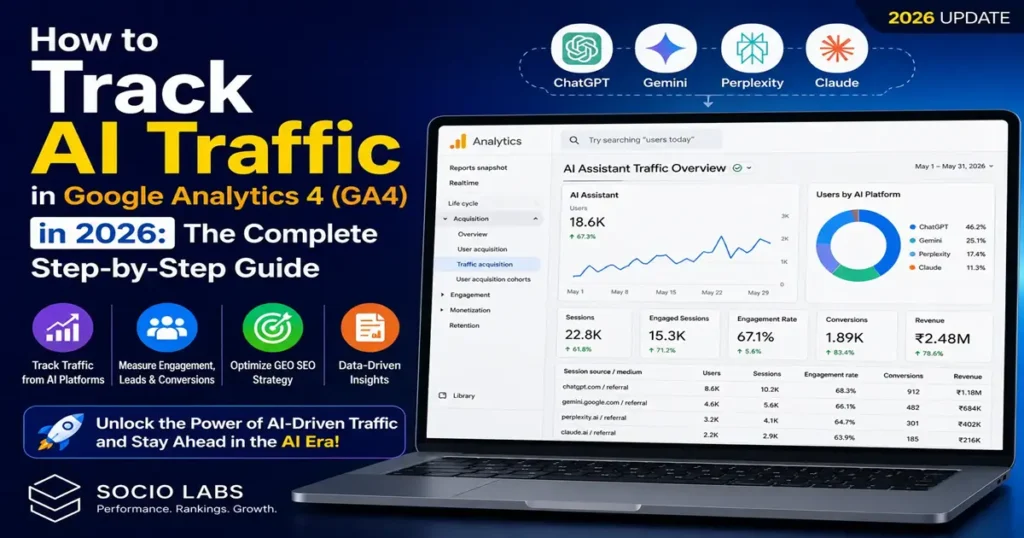
The way users discover websites is undergoing a seismic shift. In 2026, AI-powered platforms like OpenAI’s ChatGPT, Google Gemini, Perplexity AI, and Claude are no longer just tools for answering questions they have become powerful traffic sources sending real, measurable visitors to websites across every industry.
For SEO professionals, GEO SEO specialists, and digital marketers, this presents both a challenge and a major opportunity. If you are not tracking AI-driven traffic, you are missing a critical piece of your performance data. The good news is that Google Analytics 4 (GA4) now offers a built-in way to monitor this traffic directly inside your dashboard no complex workarounds required.
In this guide, you will learn exactly why AI traffic matters, what GA4’s new AI Assistant classification means, and how to build a custom AI Traffic Report from scratch in just a few steps.
Why Tracking AI Traffic Matters in 2026
AI traffic is rapidly becoming one of the fastest-growing acquisition channels for websites. Users are increasingly turning to conversational AI tools to find product recommendations, discover service providers, research businesses, and compare options tasks that were previously dominated entirely by Google Search.
Consider what is happening right now. Millions of users are asking ChatGPT for product suggestions, turning to Perplexity to find service providers, using Google Gemini to research business information, and relying on AI assistants for in-depth research and comparisons. Each of these interactions has the potential to send a visitor directly to your website.
For SEO agencies and performance marketers, this creates a powerful new reporting opportunity. You can now show clients tangible AI-driven traffic growth, measure the real-world impact of GEO SEO (Generative Engine Optimization) strategies, track AI-generated leads and conversions with full attribution, and directly compare AI traffic performance against traditional organic search. Without this data, your SEO reports are incomplete and potentially misleading.
What Is AI Assistant Traffic in GA4?
Google Analytics 4 has introduced a dedicated traffic classification called AI Assistant. This category automatically groups website visits originating from AI tools and conversational search platforms, eliminating the need to manually filter referral traffic source by source.
Under this classification, GA4 automatically categorizes traffic from platforms including chatgpt.com, gemini.google.com, perplexity.ai, and claude.ai. Instead of these visits appearing as miscellaneous referrals or going untracked, they are grouped cleanly under a single, reportable channel.
It is important to note that Google began rolling out the AI Assistant traffic classification publicly around May 2026. This means historical data prior to this rollout may not be categorized correctly, and older sessions might not appear under this label. New traffic will gradually populate your reports as the classification is applied going forward.
Latest Industry Trends: AI Search in 2026
The rise of AI-driven search is not a future prediction it is happening right now. AI platforms have moved from novelty tools to mainstream discovery engines used by hundreds of millions of people globally. Businesses that invest early in measuring and optimizing for AI visibility are positioning themselves ahead of competitors who are still focused exclusively on traditional search rankings.
GEO SEO the practice of optimizing content to appear in AI-generated answers and recommendations has emerged as a recognized discipline in 2026. Just as organic SEO required tracking keyword rankings and organic traffic, GEO SEO requires tracking which AI platforms are sending visitors, how those visitors engage, and whether they convert. GA4’s new AI Assistant channel makes this measurement possible at scale.
Step-by-Step Guide: How to Create an AI Traffic Report in GA4
Step 1: Open Google Analytics and Select Your Property
Navigate to your Google Analytics GA4 dashboard and select the website property you want to analyze. Make sure you have Editor or Administrator access to create and save custom reports.
Step 2: Navigate to the Reports Section
From the left-hand sidebar, click on Reports. This opens the main reporting dashboard where all standard and custom reports are accessible.
Step 3: Open the Library Section
Scroll to the bottom of the Reports sidebar and click Library. The Library is where GA4 allows you to create, customize, and manage your reports. This is your starting point for building a new custom report.
Step 4: Create a New Detailed Report
Inside the Library, click Create new report, then select Create detailed report, and choose Blank to start with a clean canvas. This gives you full control over the dimensions, metrics, and filters in your report.
Step 5: Remove the Default Chart (Optional)
GA4 may add a default chart at the top of your report canvas. You can remove this chart to keep the interface clean and table-focused. This step is optional but recommended for a streamlined reporting view.
Step 6: Add the Session Source / Medium Dimension
Click on Dimensions, search for Source / Medium, and select Session source / medium. Click Apply. This dimension will display exactly where your AI visitors are coming from, broken down by platform and medium.
Step 7: Add an AI Assistant Filter
Click Add Filter, then select a dimension and search for Default Channel Group. You can choose either First user default channel group or Session default channel group depending on whether you want to analyze new users or all sessions.
Step 8: Configure the Filter to Show Only AI Traffic
Set the match type to Exactly matches and enter AI Assistant in the value field. If your GA4 property has already received AI traffic, the AI Assistant option may appear as a suggestion automatically. Click Apply to activate the filter.
Step 9: Add Your Key Metrics
Now configure the metrics you want to measure inside the report. The recommended metrics for an AI traffic report are Total Users (to count the number of AI visitors), Sessions (for total AI-generated sessions), Engaged Sessions (to measure quality engagement), Average Engagement Time (to understand how long AI visitors spend on your site), Bounce Rate (as a user quality indicator), Purchases (for ecommerce tracking), and Revenue (to measure AI-driven business impact). Add each metric and click Apply.
Step 10: Save Your Custom Report
Click Save and give your report a clear, descriptive name. Recommended names include AI Traffic, GEO Traffic, AI SEO Report, or AI Assistant Traffic. Your custom report is now ready and will begin populating with data.
Step 11: Add the Report to Your GA4 Navigation
To make the report easily accessible, return to the Library, open your collection editor, search for your report name, and drag it into a relevant section such as Acquisition, SEO, or Lead Generation. Save your changes. The AI Traffic report will now appear directly in the main Reports sidebar for quick access.
What Data Will You See Inside the Report?
Once your report is live and data begins flowing, you will see a breakdown of AI traffic sources. A typical report might show chatgpt.com driving the highest volume of users and sessions, followed by perplexity.ai, then gemini.google.com, and claude.ai. Beyond raw traffic numbers, you can analyze month-over-month growth in AI visits, conversion trends from AI-driven visitors, revenue attributed to AI traffic, and engagement quality metrics compared to other channels.
This granular view gives you the data to make informed decisions about your GEO SEO strategy, content optimization, and AI visibility investments.
Key Metrics to Track for AI Traffic Performance
| Metric | Purpose |
|---|---|
| Total Users | Number of unique visitors arriving from AI platforms |
| Sessions | Total AI-generated sessions on your site |
| Engaged Sessions | Sessions where users meaningfully interacted |
| Average Engagement Time | How long AI visitors spend on your content |
| Bounce Rate | Indicator of content-visitor intent alignment |
| Purchases | Direct ecommerce conversions from AI traffic |
| Revenue | Total revenue attributable to AI platform visits |
Important Notes and Troubleshooting
If you do not yet see the AI Assistant channel group in your GA4 property, it typically means one of two things: your website has not yet received detectable AI traffic, or Google has not fully processed and classified the data for your specific property. In either case, continue building the report structure so it is ready to capture data as AI traffic grows.
Because the AI Assistant classification began rolling out publicly around May 2026, historical data from earlier periods may not be retroactively categorized. Your reports will be most accurate for traffic received after the rollout date.
Benefits of AI Traffic Reporting for SEO Agencies
For agencies offering traditional SEO, GEO SEO, AI SEO, or performance marketing services, AI traffic reporting is fast becoming a non-negotiable part of client deliverables. It enables agencies to visibly demonstrate AI visibility growth, attribute ChatGPT-driven traffic directly in client dashboards, track AI-generated conversions with full transparency, and position the agency as a forward-thinking, future-ready partner.
Monthly SEO reports that include AI traffic data alongside organic search performance give clients a complete picture of how their digital presence is performing across both traditional and AI-driven discovery channels.
Internal Linking Suggestions
When publishing this content, consider linking internally to related articles such as your guide to GEO SEO strategy, your post on optimizing content for AI search engines, your overview of GA4 custom report building, and your comparison of traditional SEO versus AI SEO performance metrics.
Conclusion: Start Measuring What Matters Now
AI-driven traffic is no longer experimental or niche. Platforms like ChatGPT, Google Gemini, Perplexity, and Claude have become real, measurable acquisition channels that are sending users to websites across every industry right now. Businesses and agencies that begin tracking this traffic today will have a significant data advantage as AI search continues to grow in influence.
By creating a custom AI Traffic Report in GA4, you gain complete visibility into which AI platforms are driving visitors, how those visitors engage with your content, and whether AI visibility is translating into leads and revenue. That visibility is the foundation of any effective GEO SEO strategy in 2026 and beyond.
Ready to future-proof your SEO reporting?
Start building your GA4 AI Traffic Report today using the steps in this guide. If you are an agency looking to add AI traffic tracking to your client reporting stack — or a business wanting to understand how AI platforms are driving your website growth — now is the time to act.
Get in touch with our team to learn how we can help you set up GA4 AI traffic tracking, build a full GEO SEO strategy, and measure your AI search visibility from day one. Don’t let your competitors get the data advantage first.
FAQS
AI Assistant traffic in GA4 refers to visitors coming from AI platforms like ChatGPT, Gemini, Perplexity, and Claude.
Tracking AI traffic helps businesses measure GEO SEO performance, AI-driven leads, user engagement, and conversions accurately.
Yes, GA4 now groups traffic from AI platforms under the AI Assistant channel classification automatically.
Key metrics include users, sessions, engagement time, bounce rate, conversions, purchases, and AI-driven revenue.
AI traffic reporting helps agencies prove GEO SEO results, track AI visibility growth, and measure AI-generated leads and revenue.